TaskPool
TaskPool为应用程序提供多线程环境,降低资源消耗并提高系统性能。无需管理线程生命周期。
TaskPool运作机制
TaskPool运作机制示意图
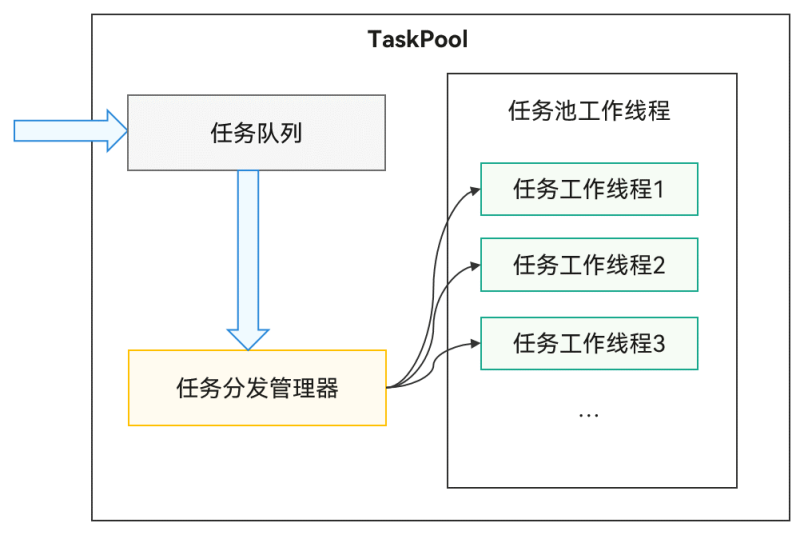
TaskPool支持在宿主线程提交任务到任务队列,系统选择合适的工作线程执行任务,并将结果返回给宿主线程。接口易用,支持任务执行、取消和指定优先级。通过系统统一线程管理,结合动态调度和负载均衡算法,可以节约系统资源。系统默认启动一个任务工作线程,任务多时会自动扩容。工作线程数量上限由设备的物理核数决定,内部管理具体数量,确保调度和执行效率最优。长时间无任务分发时会缩容,减少工作线程数量。具体扩缩容机制请参见TaskPool扩缩容机制。
TaskPool注意事项
-
实现任务的函数需要使用@Concurrent装饰器标注,且仅支持在.ets文件中使用。
-
从API version 11开始,跨并发实例传递带方法的实例对象时,该类必须使用装饰器@Sendable装饰器标注,且仅支持在.ets文件中使用。
-
任务函数(LongTask除外)在TaskPool工作线程中的执行时长不能超过3分钟。否则,任务将被强制终止。需要注意的是,这里的3分钟限制仅统计TaskPool线程的同步运行时长,不包含异步操作(如Promise或async/await)的等待时长。例如,数据库的插入、删除、更新等操作,如果是异步操作,仅计入CPU实际处理时长(如SQL解析),网络传输或磁盘I/O等待时长不计入;如果是同步操作,整个操作时长(含I/O阻塞时间)均计入限制。开发者可通过Task的属性ioDuration、cpuDuration获取执行当前任务的异步IO耗时和CPU耗时。
-
实现任务的函数入参需满足序列化支持的类型。详情请参见线程间通信对象概述。目前不支持使用@State装饰器、@Prop装饰器、@Link装饰器等装饰器修饰的复杂类型。
-
ArrayBuffer参数在TaskPool中默认转移,需要设置转移列表的话可通过接口setTransferList()设置。如果需要多次调用使用ArrayBuffer作为参数的task,则需要通过接口setCloneList()把ArrayBuffer在线程中的传输行为改成拷贝传递,避免对原有对象产生影响。
除上述注意事项外,使用TaskPool时还需注意并发注意事项。
import { taskpool } from '@kit.ArkTS';
import { BusinessError } from '@kit.BasicServicesKit';

@Concurrent
function printArrayBuffer(buffer: ArrayBuffer) {
  return buffer;
}

function testArrayBuffer() {
  const buffer = new ArrayBuffer(1);
  const group = new taskpool.TaskGroup();
  const task = new taskpool.Task(printArrayBuffer, buffer);
  group.addTask(task);
  task.setCloneList([buffer]);
  for (let i = 0; i < 5; i++) {
    taskpool.execute(group).then(() => {
      console.info('execute group success');
    }).catch((e: BusinessError) => {
      console.error(`execute group error: ${e.message}`);
    })
  }
}
-
由于不同线程中上下文对象不同,TaskPool工作线程只能使用线程安全的模块。例如,不能使用UI相关的非线程安全模块。TaskPool/Worker等工作线程不支持使用操作UI的模块、线程不安全的模块以及其他只支持在主线程中使用的模块。不支持UI模块是因为目前工作线程不支持操作UI,不支持线程不安全的模块是因为多线程使用该模块可能会导致多线程问题,只支持在主线程中使用的模块明确在文档中说明的有ApplicationContext等。线程安全的模块是指多线程同时使用该模块也不会引入多线程问题,如TaskPool/Worker/hilog等。
-
序列化传输的数据量限制为16MB。
-
Priority的IDLE优先级是用来标记需要在后台运行的耗时任务(例如数据同步、备份),它的优先级别是最低的。这种优先级的任务只在所有线程都空闲时触发执行,并且同一时间只会有一个IDLE优先级的任务执行。
-
Promise不支持跨线程传递。TaskPool返回pending或rejected状态的Promise时会失败,返回fulfilled状态的Promise时TaskPool会解析返回的结果,如果结果可以跨线程传递,则返回成功。
-
不支持在TaskPool工作线程中使用AppStorage。
-
TaskPool支持在宿主线程封装任务并提交给任务队列,理论上支持的任务数量没有上限。然而,任务的执行效率受限于任务的优先级和系统资源。当工作线程达到最大数量时,任务的执行效率可能会下降。
-
TaskPool不支持指定任务所运行的线程,任务会被分配到空闲的线程中执行。如果需要指定任务所运行的线程,建议使用Worker。
@Concurrent装饰器
使用TaskPool时,执行的并发函数必须用该装饰器修饰,否则无法通过校验。
说明:
从API version 9开始,支持使用@Concurrent装饰器声明并校验并发函数。
| @Concurrent并发装饰器 | 说明 |
|---|---|
| 装饰器参数 | 无。 |
| 使用场景 | 仅支持在Stage模型的工程中使用。仅支持在.ets文件中使用。 |
| 装饰的函数类型 | 允许标注为async函数或普通函数。禁止标注为generator、箭头函数、类方法。不支持类成员函数或者匿名函数。 |
| 装饰的函数内的变量类型 | 允许使用局部变量、入参和通过import引入的变量,禁止使用闭包变量。 |
| 装饰的函数内的返回值类型 | 支持的类型请查线程间通信对象概述。 |
说明:
由于@Concurrent标记的函数不能访问闭包,因此函数内部不能调用当前文件的其他函数,例如:
function bar() {
}

@Concurrent
function foo() {
  bar(); // 违反闭包原则,报错
}
装饰器使用示例
并发函数一般使用
并发函数为一个计算两数之和的普通函数,taskpool执行该函数并返回结果。
示例:
import { taskpool } from '@kit.ArkTS';

@Concurrent
function add(num1: number, num2: number): number {
  return num1 + num2;
}

async function concurrentFunc(): Promise<void> {
  try {
    const task: taskpool.Task = new taskpool.Task(add, 1, 2);
    console.info(`taskpool res is: ${await taskpool.execute(task)}`); // 输出结果:taskpool res is: 3
  } catch (e) {
    console.error(`taskpool execute error is: ${e}`);
  }
}

@Entry
@Component
struct Index {
  @State message: string = 'Hello World';

  build() {
    Row() {
      Column() {
        Text(this.message)
          .fontSize(50)
          .fontWeight(FontWeight.Bold)
          .onClick(() => {
            concurrentFunc();
          })
      }
      .width('100%')
    }
    .height('100%')
  }
}
并发函数返回Promise
在并发函数中返回Promise时需特别注意。如示例所示,testPromise和testPromise1等函数需处理Promise并返回结果。
示例:
import { taskpool } from '@kit.ArkTS';

@Concurrent
function testPromise(args1: number, args2: number): Promise<number> {
  return new Promise<number>((resolve, reject) => {
    resolve(args1 + args2);
  });
}

@Concurrent
async function testPromise1(args1: number, args2: number): Promise<number> {
  return new Promise<number>((resolve, reject) => {
    resolve(args1 + args2);
  });
}

@Concurrent
async function testPromise2(args1: number, args2: number): Promise<number> {
  return await new Promise<number>((resolve, reject) => {
    resolve(args1 + args2);
  });
}

@Concurrent
function testPromise3() {
  return Promise.resolve(1);
}

@Concurrent
async function testPromise4(): Promise<number> {
  return 1;
}

@Concurrent
async function testPromise5(): Promise<string> {
  return await new Promise((resolve) => {
    setTimeout(() => {
      resolve('Promise setTimeout after resolve');
    }, 1000)
  });
}

async function testConcurrentFunc() {
  const task1: taskpool.Task = new taskpool.Task(testPromise, 1, 2);
  const task2: taskpool.Task = new taskpool.Task(testPromise1, 1, 2);
  const task3: taskpool.Task = new taskpool.Task(testPromise2, 1, 2);
  const task4: taskpool.Task = new taskpool.Task(testPromise3);
  const task5: taskpool.Task = new taskpool.Task(testPromise4);
  const task6: taskpool.Task = new taskpool.Task(testPromise5);

  taskpool.execute(task1).then((d: object) => {
    console.info(`task1 res is: ${d}`); // 输出结果:task1 res is: 3
  }).catch((e: object) => {
    console.error(`task1 catch e: ${e}`);
  })
  taskpool.execute(task2).then((d: object) => {
    console.info(`task2 res is: ${d}`);
  }).catch((e: object) => {
    console.error(`task2 catch e: ${e}`); // 输出结果:task2 catch e: Error: Can't return Promise in pending state
  })
  taskpool.execute(task3).then((d: object) => {
    console.info(`task3 res is: ${d}`); // 输出结果:task3 res is: 3
  }).catch((e: object) => {
    console.error(`task3 catch e: ${e}`);
  })
  taskpool.execute(task4).then((d: object) => {
    console.info(`task4 res is: ${d}`); // 输出结果:task4 res is: 1
  }).catch((e: object) => {
    console.error(`task4 catch e: ${e}`);
  })
  taskpool.execute(task5).then((d: object) => {
    console.info(`task5 res is: ${d}`); // 输出结果:task5 res is: 1
  }).catch((e: object) => {
    console.error(`task5 catch e: ${e}`);
  })
  taskpool.execute(task6).then((d: object) => {
    console.info(`task6 res is: ${d}`); // 输出结果:task6 res is: Promise setTimeout after resolve
  }).catch((e: object) => {
    console.error(`task6 catch e: ${e}`);
  })
}

@Entry
@Component
struct Index {
  @State message: string = 'Hello World';

  build() {
    Row() {
      Column() {
        Button(this.message)
          .fontSize(50)
          .fontWeight(FontWeight.Bold)
          .onClick(() => {
            testConcurrentFunc();
          })
      }
      .width('100%')
    }
    .height('100%')
  }
}
并发函数中使用自定义类或函数
在并发函数中使用自定义类或函数时,需将其定义在单独的文件中,否则可能被视为闭包。如下示例所示。
示例:
// Index.ets
import { taskpool } from '@kit.ArkTS';
import { BusinessError } from '@kit.BasicServicesKit';
import { testAdd, MyTestA, MyTestB } from './Test';

function add(arg: number) {
  return ++arg;
}

class TestA {
  constructor(name: string) {
    this.name = name;
  }

  name: string = 'ClassA';
}

class TestB {
  static nameStr: string = 'ClassB';
}

@Concurrent
function TestFunc() {
  // case1:在并发函数中直接调用同文件内定义的类或函数

  // 直接调用同文件定义的函数add(),add飘红报错:Only imported variables and local variables can be used in @Concurrent decorated functions. <ArkTSCheck>
  // add(1);
  // 直接使用同文件定义的TestA构造,TestA飘红报错:Only imported variables and local variables can be used in @Concurrent decorated functions. <ArkTSCheck>
  // const a = new TestA('aaa');
  // 直接访问同文件定义的TestB的成员nameStr,TestB飘红报错:Only imported variables and local variables can be used in @Concurrent decorated functions. <ArkTSCheck>
  // console.info(`TestB name is: ${TestB.nameStr}`);

  // case2:在并发函数中调用定义在Test.ets文件并导入当前文件的类或函数

  // 输出结果:res1 is: 2
  console.info(`res1 is: ${testAdd(1)}`);
  const tmpStr = new MyTestA('TEST A');
  // 输出结果:res2 is: TEST A
  console.info(`res2 is: ${tmpStr.name}`);
  // 输出结果:res3 is: MyTestB
  console.info(`res3 is: ${MyTestB.nameStr}`);
}


@Entry
@Component
struct Index {
  @State message: string = 'Hello World';

  build() {
    RelativeContainer() {
      Text(this.message)
        .id('HelloWorld')
        .fontSize(50)
        .fontWeight(FontWeight.Bold)
        .alignRules({
          center: { anchor: '__container__', align: VerticalAlign.Center },
          middle: { anchor: '__container__', align: HorizontalAlign.Center }
        })
        .onClick(() => {
          const task = new taskpool.Task(TestFunc);
          taskpool.execute(task).then(() => {
            console.info('taskpool: execute task success!');
          }).catch((e: BusinessError) => {
            console.error(`taskpool: execute: Code: ${e.code}, message: ${e.message}`);
          })
        })
    }
    .height('100%')
    .width('100%')
  }
}
// Test.ets
export function testAdd(arg: number) {
  return ++arg;
}

@Sendable
export class MyTestA {
  constructor(name: string) {
    this.name = name;
  }
  name: string = 'MyTestA';
}

export class MyTestB {
  static nameStr:string = 'MyTestB';
}
并发异步函数中使用Promise
在并发异步函数中使用Promise时,建议搭配await使用,这样TaskPool可以捕获Promise中的异常。推荐使用示例如下。
示例:
import { taskpool } from '@kit.ArkTS';

@Concurrent
async function testPromiseError() {
  await new Promise<number>((resolve, reject) => {
    resolve(1);
  }).then(() => {
    throw new Error('testPromise error');
  })
}

@Concurrent
async function testPromiseError1() {
  await new Promise<string>((resolve, reject) => {
    reject('testPromiseError1 error msg');
  })
}

@Concurrent
function testPromiseError2() {
  return new Promise<string>((resolve, reject) => {
    reject('testPromiseError2 error msg');
  })
}

async function testConcurrentFunc() {
  const task1: taskpool.Task = new taskpool.Task(testPromiseError);
  const task2: taskpool.Task = new taskpool.Task(testPromiseError1);
  const task3: taskpool.Task = new taskpool.Task(testPromiseError2);

  taskpool.execute(task1).then((d: object) => {
    console.info(`task1 res is: ${d}`);
  }).catch((e: object) => {
    console.error(`task1 catch e: ${e}`); // task1 catch e: Error: testPromise error
  })
  taskpool.execute(task2).then((d: object) => {
    console.info(`task2 res is: ${d}`);
  }).catch((e: object) => {
    console.error(`task2 catch e: ${e}`); // task2 catch e: testPromiseError1 error msg
  })
  taskpool.execute(task3).then((d: object) => {
    console.info(`task3 res is: ${d}`);
  }).catch((e: object) => {
    console.error(`task3 catch e: ${e}`); // task3 catch e: testPromiseError2 error msg
  })
}

@Entry
@Component
struct Index {
  @State message: string = 'Hello World';

  build() {
    Row() {
      Column() {
        Button(this.message)
          .fontSize(50)
          .fontWeight(FontWeight.Bold)
          .onClick(() => {
            testConcurrentFunc();
          })
      }
      .width('100%')
    }
    .height('100%')
  }
}
TaskPool扩缩容机制
扩容机制
一般情况下,向任务队列提交任务时会触发扩容检测。扩容检测首先判断当前空闲工作线程数是否大于任务数。如果大于,说明线程池中有空闲工作线程,无需扩容。否则,通过负载计算确定所需工作线程数并创建。
缩容机制
扩容后,TaskPool创建多个工作线程,但当任务数减少后,这些线程就会处于空闲状态,造成资源浪费,因此,TaskPool提供了缩容机制。TaskPool使用定时器,每30秒检测一次当前负载,并尝试释放空闲的工作线程。释放的线程需满足以下条件:
-
该线程空闲时长达到30s。
-
该线程上未执行长时任务(LongTask)。
-
该线程上没有业务申请且未释放的句柄,例如Timer(定时器)。
-
该线程处于非调试调优阶段。
-
该线程中不存在已创建未销毁的子Worker。